Showing posts with label livebinders. Show all posts

Wednesday, September 3, 2014

5 Back to School LiveBinders


The 2014 school year has kicked off for many schools recently.  Teachers are collecting and organizing resources for lesson plans and students are building E-Portfolios to demonstrate and reflect upon their learning.

Here are 5 LiveBinders to help you and your students for back to school:

1.  Know your Students by Chandra Manning

Know Your Students

This LiveBinder is full of excellent resources.  Resources range from: Meet the teacher, icebreakers and learning styles.  This binder is a must to start planning your year!

2.  First Five Days by Joy Kirr

First Five Days

This LiveBinder, from Joy Kirr, is a outstanding resource to get your school year started!  This binder includes icebreakers, letters and videos examples you can send home with your students and blog posts about the first days of school.  Another must have LiveBiinder to add to your resources!

3.  Ipads in Schools by Mike Fisher

iPads in Schools

If you are looking to use Ipads in your classroom this year, this LiveBinder is where you will want to start. Voted one of the Top 10 LiveBinders in 2011, this LiveBinder has everything from lesson plans, lists of multiple apps and resources for Special Education.

4.  Evernote for Educators by Justin Stallings

Evernote for Educators

Evernote for Educators, created by myself, was voted as one of the Top 10 LiveBinders in 2013.  If you are looking to get started with Evernote this year, this binder has you covered.

5.  Free Technology Tools for Teachers by Mickie Mueller
Free Technology Tools for Teachers

Voted as a one of the Top 10 LiveBinders of 2012, this LiveBinder is packed full of resources.  If you need resources for photo editing, Google, coding and presentation tools then this binder will have what you are looking for.

Looking to get involved with LiveBinders this year in your classroom?  Check out my recently released guide, Educator's Guide to LiveBinders on theedublogger.com.  Special thanks to The Edublogger and the ladies at LiveBinders for their help on putting the guide together!

Sunday, May 11, 2014

Livebinders for the Social Studies - Part 5


Livebinders for the Social Studies - Part 5:  Presenting with Livebinders


When it comes to presenting material to the classroom, there are several platforms to choose from - platforms ranging from Microsoft Powerpoint to Apple Keynote and a slew of others.  These platforms provide a means of organizing data and presenting it to the classroom.  I myself have previously used Powerpoint when providing content every now and then to the classroom, which can be useful if used to it's fullest potential.

With that being said, one aspect that needs to bring special attention to your material/lesson is how engaged will it make your students in the classroom?  Thanks to Livebinders, students (and teachers) can now present the material they have created or put together to the classroom and beyond.

Livebinders provide a sense of ownership

Before we get into how you can present with Livebinders, you may be asking why you should be using Livebinders instead of the other options that are available?  Don't get me wrong, I think platforms like Powerpoint and Keynote can be useful when used properly.  With Livebinders, however, students can create their own online portfolio and work on it throughout the year.  With Powerpoints, once it is completed, students don't typically come back and build on it unless you design the lesson that way. Livebinders give the students ownership of their own learning and they are able to reflect upon what they have done.

Presenting with Livebinders

With Livebinders, you have the option of creating a presentation of your material.

To put your Livebinder in "Present" mode, first put your cursor over the "eye" on the top navigation panel:


When you do that, you should see a option to select "Present".  Click on "Present".  This will put your Livebinder into a presentation mode, which will look like this:


If you will notice, the "Present" mode gives your Livebinder more of a finished product.  You see the name of your Livebinder at the top left hand corner, the binder author at the top right and of course the material of your Livebinder being the center focus.

Using Livebinders also saves time.  You can fill your Livebinder with links to websites, videos and pictures. There's no need to create a slideshow and insert images or videos because they are already in your Livebinder ready to go.  Students can use Livebinders to present the material or projects they learned throughout the entire year.

This will show how the student has grown and learned since entering your classroom.  Reflection is a huge part of the learning process.

If you have any videos, pictures or stories to share about how you have used Livebinders in your classroom, I would LOVE to hear about them.  Please feel free to DM on Twitter or Google + at @justinstallings.

Tuesday, March 25, 2014

Livebinders for the Social Studies - Part 4


Livebinders for the Social Studies - Part 4: Using Livebinders to build on collaborative skills

On the previous post on "Livebinders for the Social Studies" we looked at how you can use the "Livebinder it" tool and how to use Livebinders in general to organize and gather resources for lesson plans.  On this post, we are going to look at how students can use Livebinders to build on their collaborative skills.    

When it comes to the Social Studies classroom, students take part in research projects on historical events or historical figures throughout the year.  Students research data in books, newspaper articles and, primarily, online content.  When you determine that your students will complete the project in groups, something you must consider is the "nuts and bolts" of how it will be done.  How are my students going to collaborate on the project?  What is the best way to make the project effective that will build my students' skills?

With Livebinders, you can provide your students a central location where they can collaborate and combine their efforts to enhance their learning.

The benefits of using Livebinders  

As a student teacher, I tried to engage my students as much as possible in collaborative activities.  One of the ways I used was creating a webquest and assigning responsibilities to where each group member had a responsibility (jigsaw method).  When I made the webquest, I hoped that my students would at least like the activity and have some fun while learning,  When my students started getting hands-on with it I realized how much they loved doing something besides something on paper or listen to me lecture.  What I also realized is how important it is to provide each student ownership of the project.

Livebinders gives you both the means of engaging your students and giving them ownership of what they contribute.  Livebinders also provide a means of collaborating and contributing throughout the year.  This is something they can constantly update and reflect upon.  

Collaborating on a Livebinder

Livebinders provide a way to engage each one of your students and give ownership of the project to not one member, but to all.  Each student will have the opportunity to contribute to the Livebinder when they are added as a collaborator.  Whenever they find a resource, they can add it.  Each member of the group can add a tab to their group's Livebinder and add content to that tab - which gives them part ownership of their group's Livebinder.

Having your students do a project on World War 1?  One member can create a tab on the key historical figures, one can create a tab on battles and another member can create a tab on pictures/videos.  All of this combined into one Livebinder where the students can reflect upon their learning.

When students are engaged, the learning experience is enhanced.  This also has the potential of sparking interest in your students that may have not been discovered prior.  As a educator, these interests are key to providing the most meaningful lessons possible.


How to add collaborators to your Livebinder

Please note that each student will have to have previously signed up for their own Livebinder account in order to collaborate on any Livebinder. Click here to go to the blog post on www.livebinders.com about how to have your students sign-up for a Livebinders account.

There are two ways which you can add collaborators to your Livebinder.

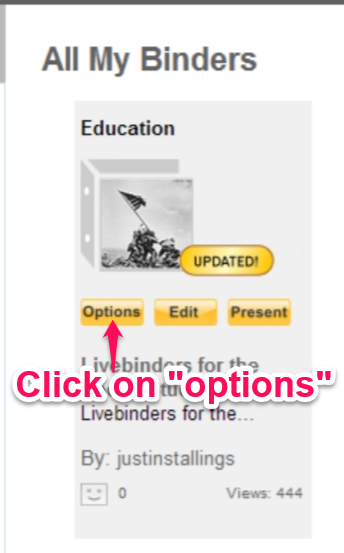
The first, and quickest way, is to go to your "My Binders" tab. From there, place your cursor on the Livebinder you would like to add collaborators to - this will bring up three quick menu tabs (Options, Edit, Present).

You'll then want to click on the "options" tab which will give you several options to choose from, including: share this Livebinder, collaborate, show details, link or embed, add to shelf, make a copy, edit it, present and delete from your account.

The option you'll want to click on should be the second selection, "collaborate".

Once you click on "collaborate" you will notice that the "Add or Remove Collaborators" selection is now on the left side of the webpage.

The second way is to add collaborators is via the "edit this binder" link once you open your Livebinder.  Simply open your binder, click on "edit this binder" link and then "binder settings".

Once you get into the binder settings of the Livebinder, you'll see the "add/delete" button where you can update your collaborators for that Livebinder.  
The collaborators that you add to your Livebinder will receive a email asking to approve to collaborate on that Livebinder.  Once they complete those steps, they will be added as a collaborator to that Livebinder.

Here's an example of a Livebinder that was collaborated by myself and Jen Petras (@jenpetras) on Cyberbullying:

Cyber Bullying

For more details on having your students collaborate on a Livebinder, please visit this Livebinder created by Tina & Barbara, the creators of Livebinders:

Thursday, February 20, 2014

Livebinders for the Social Studies - Part 3


Livebinders for the Social Studies - Part 3:  Collecting and organizing lesson plan resources 

Now that you have had a chance to see some excellent Social Studies Livebinders and see how they are used, let's move on to the third Livebinders for the Social Studies post - collecting and organizing lesson plan resources.  I have also created a new Livebinder, Livebinders for the Social Studies, to show examples and work along side everyone as we go start going more in-depth into Livebinders:


Getting Organized

Livebinders provides a central location for all of your resources that you may have.  Regardless if you use Evernote, Dropbox, Google Docs or Microsoft programs such as Word or Excel, you can store those resources all in one Livebinder for quick and easy organization.  If you would like to add documents, pictures, etc to your binder, go to the "view" menu and click on "edit".  From there, click on "Add Content" and choose the type of content you would like to add.      


Livebinders also has a easy way to add documents from your Dropbox account and your Evernote account. 

To add files from your Dropbox account, simply click on "Add Content" then click on "My Dropbox".   


For material from your Evernote account, you can add the link via the Livebinders app or get the URL to the note or notebook and insert it into the tab or subtab of your choice.  Click here to read the recent blog post from the Livebinders blog about the Evernote addition to the Ipad App.  


Collecting Digital Resources

As educators, we run across multiple resources while searching the web.  Thanks to Livebinders, you can collect, save and share all of those resources.  To get started collecting your digital resources, the first thing you'll want to do is install the "Livebinder It" bookmarklet tool, click here to go to that page at www.livebinders.com.  
 Once you have installed the bookmarklet tool and found a website you would like to add to your binder, simply click on "Livebinder It" and a new window will pop-up allowing you to select which binder to add it to:


Need to see some of this in action?  Please feel free to visit the Livebinder at the beginning of this post, Livebinders for the Social Studies.  I will be working on it going forward with the next posts so stay tuned! 


Friday, January 31, 2014

Livebinders for the Social Studies - Part 2


Livebinders for the Social Studies - Part 2: 5 Excellent Social Studies Livebinders to see

On this second part of the Livebinders for the Social Studies series, I thought we should look at 5 excellent Social Studies Livebinders to get you familiar with how other educators and enthusiasts use Livebinders in the Social Studies field.  

Social Studies Resources Central

This Livebinder from GValdez is full of resources to use.  It has everything from History resources, Economic resources, graphs and virtual field trips.  
Social Studies Resources Central

A House Divided

Andrew Weber has put together a excellent binder, which was voted as one of the top ten Livebinders in 2012.  If you need resources for the Civil War period in American history, this is the Livebinder for you.  It has everything from vocabulary, readings and online tools.  
A House Divided

Ipad Apps for Social Studies

Looking for Social Studies Ipad apps?  Then this Livebinder from Angela Cunningham (@kyteacher) has you covered.  It has app categories from History, Civics and Government and Geography.  
iPad Apps

Black History Month

This is a wonderful Livebinder put together by kb...konnected.  It is full of lesson plans, printables and other resources regarding Black History month.  
Black History Month––Martin Luther King Jr.Day

Lewis & Clark

This is a excellent Livebinder from wisermar covering resources over the Lewis & Clark Expedition.  If has everything you'll need to cover this lesson in class - webquests, maps and clip art images.   

Sunday, January 26, 2014

Livebinders for the Social Studies - What are Livebinders?


Livebinders for the Social Studies - Part 1: What are Livebinders?

For over a year now, I have been guest posting a series of posts entitled "Evernote for the Social Studies" on notanotherhistoryteacher.edublogs.org, a blog by Melissa Seideman.  There are still a multitude of uses that Evernote holds for Social Studies teachers and students that I have yet to blog about, and more posts will be coming on that subject throughout the year.

Along with Evernote, I have been blogging about Livebinders and how they can further engage our students in the classroom and assist educators in the teaching process.  This year, I also wanted to look at how Livebinders can be used specifically in the Social Studies classroom.

I will also be cross-posting this series on notanotherhistoryteacher.edublogs.org.  If you have yet to follow that blog or follow Melissa Seideman on Twitter (@mseideman), now would be a great time.  Melissa has also posted excellent posts about Educational Technology and Social Studies related resources.

Livebinders - Your 3-ring binder for the web

Livebinders can be your one central source to collect resources, share resources, and collaborate with other educators and technology enthusiasts.  You can collect and curate resources that include: web addresses, documents, photos and many other things in your Livebinder.

In today's classroom, students and teachers use the power of the internet to gather resources for projects, resources for papers and resources to share in the classroom.  According to livebinders.com, "Physical 3-ring binders used to be the easiest way to organize all your educational resources. But now so much of what you want to organize is online. LiveBinders not only replaces the old 3-ring binder, but also opens up new opportunities for collaborating, organizing, and sharing that were never possible before."     


Here are some of my favorite ideas that students can use Livebinders for:


  1. Collect/organize blog posts - their own or fellow classmates
  2. Create a "My Evernote" tab - students can insert links to certain Evernote notes
  3. Research - students can use the "Livebinder It" browser extension to add a website link to their binder
  4. Comment on fellow classmate's binders - Livebinders allow you to add comments to a binder, which is great for peer review. 
  5. Upload lecture notes - whether it be a Evernote note link or a MS Word doc, students can upload/insert their class lecture notes.
Why Use Livebinders?

There a multiple reasons to use Livebinders in and out of the classroom.  It's free and very easy to use.  The creators of Livebiners, Tina and Barbara (@livebinders), provide the best support I've ever experienced with anything related to technology.  They love to share other's Livebinders and love to hear how what they created is making a difference.  


The problem with physical 3-ring binders is that resources and learning that has been done and collected with them stay in the binder.  Students have less of a opportunity to share what they have learned with physical binders, however, with Livebinders students can share via Twitter, Facebook, or by URL - thus giving students a multitude of ways to share with their fellow classmates.   

Want more Livebinders info?  Here are some more resources:


Click here for my other blog posts about Livebinders

Livebinders website: www.livebinders.com


Here is one of my Livebinders for Social Studies resources:


Wednesday, November 20, 2013

New Livebinders Feature


If you are looking to get your class involved with Livebinders, it's now easier than ever.
  
Livebinders recently announced a new feature that allows students under the age of 13 to now sign up for a Livebinders account with their teacher's email address.

This new feature now opens the door for all students, regardless of age, to have a Livebinders account.  Of course, please refer to the Livebinders "Privacy Policy" prior to walking your students through the registration process.

How to have students sign up for a Livebinders account:

Here's a quick rundown of how to direct students to sign up on Livebinders.com:

Have students go to www.livebinders.com.  Then have them click on "sign up":


Once they get to the sign up page, have them click on "yes" where it says "student signing up with teacher's email address":


Once they click on "yes", they will get two different boxes - "Teacher's Email Address" and "Please Retype Teacher's Email Address".  At this point, they can enter the teacher's email address instead of their own.  You'll want to do this if you have any students under the age of 13:

Conclusion

I can not speak the praises of Livebinders highly enough.  When I first started to become involved in Educational Technology, Livebinders is where I started.  The whole point of Educational Technology is to get students more engaged in the learning process...Livebinders is a perfect start to allow your students to build, grow and engage as they learn in your classroom.  

Learn more about Livebinders at www.livebinders.com or feel free to look through the multiple posts I have on this blog about Livebinders.

Friday, September 20, 2013

Back to School Tech Part 2: Livebinders


If you are looking to get into Educational Technology this year, Livebinders is the best place to start.  From a personal standpoint, Livebinders is where I started my journal in professional development in education and Dducational Technology after I graduated college.  To say that Livebinders opened my world to all kinds of educators and new ways to learn would be a understatement.  Here's a brief look at this awesome tool:

Livebinders - collect and share resources

Livebinders can be your one central source to collect resources, share resources, and collaborate with other educators and technology enthusiasts.  You can collect web addresses, documents,  photos and many other things in your Livebinder.  You can create a specific Livebinder for any purpose that you have interest in and want to share with others or you can choose to create a private one and keep it personal.     

For example, I've been a member of Livebinders since 2011.  Since that time, I've collected and shared multiple resources like Evernote, Study Blue, Social Studies topics and many other categories.  Here's some of my Livebinders:


Livebinders - collaborate and reflect with other educators

As I previously stated, Livebinders is where I started getting involved in professional development with other educators in educational technology.  As I started watching how other people were using Livebinders and sharing them on Twitter, I became increasingly eager to become involved.  One of my very good Twitter friends, Jen Petras (@jenpetras), one day asked if I would collaborate with her on a Livebinder over Cyberbullying.  Over the course of a few weeks, we were able to gather and collect resources into one Livebinder.  Here's where it is today:

Cyber Bullying

What is great about this is that I live in Texas and she lives in Ohio - two people who live in different states collaborating with each other.  Just imagine if all educators and students took advantage of this opportunity!

Why Livebinders?

I can not speak of Livebinders highly enough.  There a ton of reasons to use Livebinders and incorporate it in your classroom or personal life.  It's free, it's extremely easy to use, you will meet some amazing people and the list goes on.  One thing, however, stands out for me and that's the creators.  Tina and Barbara (@livebinders) provide the best support I've ever experienced with anything related to technology.  They love to share other's Livebinders and love to hear how what they created is making a difference.  They also are happy to provide you tech support in case you need assistance.  I once needed to correct a error on my username on my account so I sent them a Twitter message and it had been completed within a couple of hours - proof that they care for their customers.

I've previously told Tina and Barbara that "Livebinders have changed the face of education"...I firmly believe this has rung true.

Want more Livebinders info?  Here are some more resources:

My other blog posts about Livebinders:  http://engagedwithtech.blogspot.com/search/label/livebinders#.Ujz6OYZwqSo

Livebinders website: www.livebinders.com


Wednesday, June 26, 2013

Evernote for Educators wins Top 10 Livebinders!


During this year's Livebinders Top 10 contest, Evernote for Educators was voted as one of the Top 10 winners!

I wanted to thank everyone so much for voting for this Livebinder.  I truly hope you have been able to use this Livebinder for any resource you might need for Evernote.  Rest assured, I will continue to update this Livebinder as much as possible.

Also, congrats to all the other winners and nominees for this year's contest!  Here's the Livebinder of all the Livebinders that won and were nominated this year:

Tuesday, January 8, 2013

Building a digital portfolio with Livebinders

With today's classrooms starting to use more online resources to enhance the learning experience, the question could be raised on how we showcase and catalog what teachers and students are doing in the classroom.  If students create an online project or online document, how can they share that with their fellow classmates and others around the world?  Thanks to Livebinders, this question has been answered - all while being free and extremely easy to use.  

Livebinders is a free online service that allows you to collect resources and create online binders to share via social media and embed on your blog or website.  Here's a great post from the Livebinders blog about how educators are using Livebinders: 10 Great Ways that Educators are Using LiveBinders.  

Digital portfolios is a excellent way to showcase what students are doing in the classroom.  Remember when you were in elementary school and you drew a picture or got a good grade on a paper - where did it usually end up?  Mine typically was pinned on the refrigerator by my parents or got placed in a folder - which I only looked at it every so often.  Thus, this raises a question, "What is the point of doing a project or any other activity that will just end up getting thrown away or put aside for only one or two people to see?"  

That is what I love about the idea of having students create digital portfolios - they can go back at any time and reflect upon their learning and they can share what they did with everyone they want.  Part of the learning process, I believe, is to discover, create, and share.

For example, here's my Educational Technology Livebinder shelf:


As teachers, we should focus on learning ourselves.  Thanks to Livebinders, I am able to discover, create and share resources on things live educational technology, social studies, pedagogy, etc.  Now, put this tool in the hands of students - do you think this would engage students more if they were to create their very own "digital portfolio" for what they were doing in class?

Students can make their Livebinder their own - adding photos, website links, Youtube videos and upload documents.


Once the student has added content to their binder, they can share via social media, email, or simply grab the link or embed code for the binder:


Here are some of my favorite ideas that students can use Livebinders for:
  1. Collect/organize blog posts - their own or fellow classmates
  2. Create a "My Evernote" tab - students can insert links to certain Evernote notes
  3. Research - students can use the "Livebinder It" browser extension to add a website link to their binder
  4. Comment on fellow classmate's binders - Livebinders allow you to add comments to a binder, which is great for peer review. 
  5. Upload lecture notes - whether it be a Evernote note link or a MS Word doc, students can upload/insert their class lecture notes.
There a ton of ways teachers and students can use Livebinders.  If you are also concerned with customer service, from a teacher standpoint, to help you with the website, Tina and Barbara (makers of the website) are my favorite by far.  A few months ago I need to make a correction to my user ID - I simply contacted them via Twitter (@livebinders) and within a hour or so it was done.  I've contacted other websites that I use at least twice about technical issues I've experienced and never heard back.  Tina and Barbara actually do care about you and your students and the experience you have on the website.  I've been a member of the website going on two years now and I've been blown away by the service and experience I've had.  

If you do plan to use technology in your classroom, Livebinders would be one of my top picks to use. 

Here are some other blog posts I've done over Livebinders in the past:

Livebinder It Tool


Thursday, December 6, 2012

Livebinder it Tool


Livebinders is a excellent way to gather and organize information.  You can create separate binders for whatever topic you may be working on--i.e. education, finance, cooking, etc.  

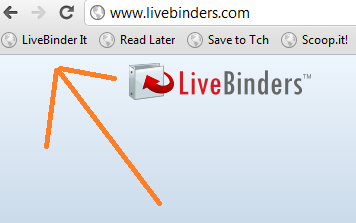
If you are searching on the web and run across a website or article that you find interesting or useful, Livebinders gives you a very handy tool to simply click and save the URL into one of your livebinders, the Livebinder it tool.  Here's the "livebinder it" extension I use for the Google Chrome browser:


When you click on the extension, it will provide you with the ability to organize the content into a livebinder you've already created or you can choose to create a new one.  You can also choose whether to put it as a new tab or put it as a subtab into a existing tab:


What is also nice is that Livebinders also provides another handy tool, the "livebinder it button" for your website or blog.  If you have anyone who visits your blog or website and you want to give them a way to save a blog post or article you have posted, you can add the "livebinder it" tool to provide them the means to save that content.  Here's a screen shot of it on my blog:


These tools are definitely something that you should utilize to make your life so much easier online.  And, of course, this is free from livebinders.com, just as the website itself is free. Check it out! 

Don't grade student's binders, grade their Livebinders


I've actually had off work this week for the first time in a very long time.  So, I've decided to look back over when I was a student teacher and reflect on what went wrong and what went right.  

My Student teaching days

I student taught 12th grade Economics in a low socioeconomic part of the district.  Some of my students had jobs to help pay for their parent's bills and others just had a less than ideal home life.  That being said, however, I loved all of my kids.  There were days that were rougher than others, but the good days always trumped the bad ones.  

The one thing that I have thought about numerous times since my student teaching days, about 2 years ago, was how my co-op teacher and the other teachers graded student's notebooks.  The classroom that I was in was shared between my cooperating teacher and another teacher, both of which required students to have spirals with notes and glued assignments to be graded later.  All the binders from all classes from both teachers were "organized" into stack-able bins one on top of another.  Of  course, some of the classes had close to about 30 students, which when they are all piled into the bins, they tend to fall over or fall out.  

That was a issue for me on a weekly (if not daily) basis.  I had spirals go missing, one student accused another student of stealing their's, and not to mention they would occasionally fall apart from wear and tear.  When it came time to do the grading,  it took a very long time just to go through one by one and make sure that everything was in place.  Besides the fact that they weighed 5 tons, it was always a uphill battle to keep these things around.  When my student teaching was done, I said to myself that there has to be a better way to do this. 

Use Livebinders instead


The school that I student taught at wasn't up-to-par when it came to educational technology or using it in the classroom.  However, when I finally get my own class, I know the solution to this problem...Livebinders. 

Livebinders is a amazing tool to utilize in and out of the classroom.  It provides the means of gathering and organizing content in a streamlined website at livebinders.com.  Of course, the first thing that I thought about was the fact that I taught in a lower economic part of the district--but I don't buy the whole "we don't have the money" excuse to not have these tools in the classroom.  For starters, Livebinders are free--they will not cost the students/parents/teachers one dime--so money is not a factor when using Livebinders.  

Combine Evernote with Livebinders


Secondly, some might ask how exactly do you get the student's notes into their livebinder?  The suggestion I would have is simple--use Evernote.  Evernote is another free service that makes organization a breeze.  Sure, you can have students scan there notes on a scanner, save it on a flash drive, have them upload it to their computer or a library computer, save it to their computer file, and then finally upload it into their livebinder, or you can just use Evernote.  Let's look at that procedure again with Evernote:  Use a Lexmark smartsolution printer (about $80.00) that is connected to the student's Evernote accounts, have them scan their notes, upload to Evernote from the scanner, get the unique URL from the Evernote note, and insert into their Livebinder--a lot simpler right?  

But what, you might ask, if you can not afford the scanner?  Students have cell phones--99% of my students had them in class, so I don't see that being a issue of students not having them at all.  With their cell phone/smart phone, they can scan their notes directly into Evernote via the Evernote app.  They can now get to a computer, grab the link, and insert it into their Livebinder.

Making grading easier

Now that you have students upload their notes into their Livebinder, you can easily access the student's livebinder and grade accordingly.  Students can have tabs in their Livebinder, named "Class Notes", for easy organization.  They can upload the scan into a subtab of the "Class Notes" tab with the title of the notes or even the date.  No 5 tons of paper to sort through, no missing spirals, etc.  This isn't the end-all solution to this problem, however, I would much rather do grading this way compared to dealing with student's actually hard copy notes.  This is just a suggestion that might make things easier in the classroom.   

Thoughts?    

5 Reasons why you should be using Livebinders


If you follow me on Twitter or Google +, you know how much I LOVE Livebinders.  It is a website that I visit on a daily basis and regularly update my resources on. Thus, I've decided to list the top 5 reasons why you should be using Livebinders.  

1. Professional Development:

I can honestly say that if it had not been for Livebinders, I would be no where near the level of professional development that I am now.  Livebinders is the first 21st century educational technology that got me hooked into finding educational tools and learning how to use those in the classroom.  I had a job interview at a school a few months ago and I explained Livebinders to the Social Studies department head--who had never heard of it before.  As I finished telling him about it, he literally started walking out of the room to get his computer to check it out!  (of course he didn't, but you can see his excitement).  Livebinders.com provides a means for anyone, for the purpose of this post a educator, the means to collaborate with someone who is thousands of miles away.  I personally had the privilege of collaborating on a "Cyberbullying" livebinder with Jen Petras--a technology teacher in Ohio.  To put this in the realm of all things, I live in TX and she lives in OH!  The fact that you can collaborate with someone that easily is reason enough to get a livebinders account.  To add a collaborator to your livebinder, all you do is email them a link and the both of you can start adding content to the same Livebinder!  Here's our livebinder, please feel free to view:

  
P.S. Jen is a fantastic educator and I've learned quite a lot from her.
  
2. One stop collection of ALL your resources

Ever actually "shopped" around at all the different websites for data collection?  If you haven't, you'll be celebrating your 100th birthday by the time you get to the last page of search results.  Livebinders gives you the freedom of having to have 500 web resources for collecting all your documents, web clippings, etc.  If you are a teacher, that fact that you can create a class livebinder and embed it on your class site/blog should be a dream come true.  There's no more questions like "Can I get a copy of last weeks assignment?" or "Where is your notes from the lecture?"  Just direct them to your livebinder where you've uploaded your materials and they can print it/save it when/where they need it.  

3. Connection to other Educational Resources

Again, if you follow me on Twitter or Google Plus, I'm a HUGE advocate of Evernote and Study Blue.  With Livebinders, I've been able to collect resources and share them (via Twitter, Google Plus, Facebook, etc) on Evernote and Study Blue.  Had it not been the advent of Livebinders, there is no way I could gather all the resources that I have gotten and been able to share them with the world about Evernote and Study Blue.  Educators should keep themselves up to date on educational resources and the fact that Livebinders help you gather resources on them and narrows down your search for content about them is priceless.  Here's my Livebinders on Evernote and Study Blue:


Evernote for Educators

4. Livebinders save you time

Who doesn't have time to spend countless hours on the computer searching for content?  If you do actually have that kind of time, then your job probably doesn't call for you to search for resources in the first place.  Again, for the sake of this post, in the case for teachers Livebinders.com can help you get resources in a flash. For example, let's say you have a interest on how to use an Ipad in your classroom.  On the search tool on the website, simply type "Ipad" and hit "search".  As of the creation of this post, this will give you over 300 livebinders over Ipads themselves!

5. It's Free!

Would you rather pay a website for all these features or would you rather get it for free?  Correct, you answered "free"!  And if you are always looking for free resources, you're probably thinking, "ok, here comes the solicitation ads!", but, not in this case.  Livebinders does not have ads that will pop up on your screen telling you that you are the 1 billionth customer and you've just won the state of Rhode Isand, or ads that clutter up the binder themselves.  The fact that Livebinders give you all this great material and resources at the touch of your fingertips and for free is nothing short of remarkable.

I would like to think the creators of Livebinders, Tina and Barbara, for making such a awesome tool.    As soon as the economy turns back around and I find a teaching job, you can rest assured that I will have my students using Livebinders!